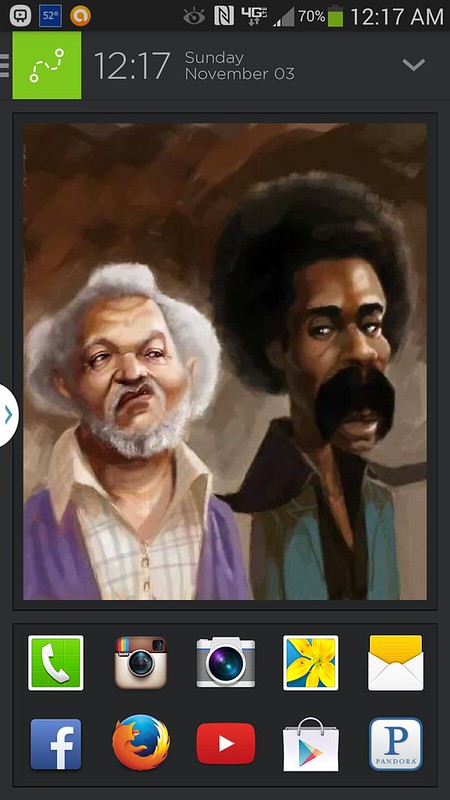
Post your Android home screen....

dfMdJ.jpg


5pcsSSoO1kgsZgKkysnVaGvsXFqKt93ZCUDsqdY8nkY-xQrA0kUaYbAwJneAxzAzLx0


Gold world time clock
Become the owner of a beautiful clock live wallpaper from the unique collection!
Compatible with TABLET PC and android PHONES.
Spectacular live wallpaper of an antique golden clock mechanism dated back to the end of the XIX century.

Take a pick the way this priceless piece of art clock is constructed inside.
Move the dial around or set up a desired speed for certain groups of mechanism; admire the exquisite luxury on your cell phone or tablet pc.
Part of a unique collection of watches for all occasions.

What's in this version : (Updated : Jan 24, 2013)
Timezone bug fixed.
New engine version.
Required Android O/S : 2.1+


DOWNLOAD


HdeJl.jpg


grSPGg_ZFyTuS50Jtec7IUbiMQy-791sCfafk1Qx-YTxzwcYMQjZFS0Jq2u1Q-shS3M


3UjMaer2gsj_0k4kIdDWHjW4cpIwtj07PaDxya_7lm3B1mL430iOR-yGmEantRbIa6eL


DdlFPma34lSBd22SDQVntvzyqFpGb4f3Jce2gFdZJjUwP6G-UNQG3QoOcJG1nAfPioY


DOWNLOAD


PnLcx.png


WESeu1sIohDx0PhWQ4w1wY9aum_hn-qQT20VBlB43oMHBMKryiVziyYSEzvjBiKuIAvN


2JS7umkmi2_ytaHeVON8z3xJ50e9dmA3pJmJSLuPz0obByK1SQ-v5Aa9YKNhZIOT07E
P0Rl_8a6vFazSk2rj7WMN5ueLmZbClxi1VdyfpCqJpHaOqx-TJNKwmNBiROABzsdclo


Apex Launcher Pro
Powerful, fast, and highly customizable home replacement for Android 4.0+.
Apex Launcher helps you create a customized homescreen experience on your Ice Cream Sandwich (Android 4.0) device.

Features:
Customizable homescreen grid size and up to 9 homescreens
Scrollable dock with up to 7 icons per page and up to 5 pages
Infinite & elastic scrolling (homescreen, drawer and dock)
Fancy transition effects (tablet, cube, etc.)
Hide elements as you want (persistent search bar, status bar, or even the dock)
Customizable icons and labels for shortcuts and folders
Choose different folder preview styles and background
Multiple drawer styles (transparent/opaque, horizontal/vertical, paginated/continuous)
Drawer apps sorting (title, install date, mostly used)
Hide apps from the drawer
Lock your desktop to prevent accidental changes
Enjoy homescreen gestures (pinch, swipe up/down, double tap)
Advanced theme engine (icon packs, skins, etc.)
Backup/restore settings and data
Optimized for both phones and tablets
Lots of other customization options!
Pro Features:
Multiple configurable drawer tabs
Unread count notifications
Dock swipe gestures
Two finger gestures
More transition effects
ADW, LauncherPro, and Go Launcher theme support
Batch add option for folders
Option to merge folder contents
Widgets in dock (1x1 only)
Overlapping widgets
More features on the way!
Note:
Due to limitations of the Android framework, you won't be able to add widgets from the app drawer without root access. If your device is rooted, please enable the Root Helper via Settings > Advanced settings > Enable Root Helper.

Tips:
Pinch the screen to access screen previews (like Exposé or HTC Sense).
Long press an icon to drag and drop it over another one to create a folder.
Long press icons/folders on the desktop and choose edit from the popup menu to customize icons and labels.
Drag, hover, and drop app icons over the delete button at the top of the screen to quickly uninstall apps.
Long press an app in the hide apps list to quickly launch that app.
Switch to single screen wallpaper mode to fix wallpaper zooming issues.
Enable the Root Helper in advanced settings (root required) to add widgets from the drawer.
What's in this version : (Updated : Nov 14, 2012)
New permissions are required to import data from other launchers.
Merged changes from Android 4.2
Option to change icon size
New Apex action to expand quick settings
Import desktop data from other launchers
Improved theme support
Added dock swipe gesture on folders (pro)
Added support for Next Honeycomb LWP
Fixed shortcut picker for Android 4.2
Fixed TouchWiz widget issues
Various bug fixes and optimizations
Updated translations
Required Android O/S : 4.0+


DOWNLOAD

OR

DOWNLOAD


6JGQl.jpg


DOWNLOAD


UlILT1J.jpg


DOWNLOAD​
 
QMevK.png


ZPAkhfFnHFwRk9WtyEYjn4Wu-hz35cVcLBdpkhTXEA0NhdW0e3EmSD-qT_j3tgDerBw
Nsc-G6IIF209mrFqpg6H1U5mY0YIQUAsoQBRoWsMiL2QGwSDyQigKIn_-hVzv0p6MWLn

f3AN3YObZhQGIWtchlNtMqoESeSvkVEA2nzUrf3wzdyz7xpBHv-W5BlOXk4MdofYw94
PxXtUGV8ZjZjC9L5RGwl23tb3yv2_MtLQmJjAYBa16urjcGnaoqiQlE5Gg3_jyAVXWQ


Zooper Widget Pro play.google.com.zwpro
Minimal, classy, extremely customizable and battery friendly Clock Widget with all the data you need, at once.

Features:
Sample templates included, no need to download anything else
Some custom fonts already included, additional can be added on sdcard/fonts
Create your templates easily, no functional limit
Build your style and change everything, color, text, shapes, position and more
Battery info (remaining time, percentage, temperature, voltage)
World clock (multiple timezones on the same widget)
Weather with two days forecast even for multiple locations on same widget
Calendar info with free customization
System info, like uptime, next alarm, sd card space
Wifi network name, cell operator
Sunrise and sunset even for multiple location at once
Pro Features:
No Ads
Widget on tap action (and "module" click action soon)
Save your templates
BATTERY:
Zooper Widget has been built from ground up with battery in mind, nothing will be done while your phone sleeps, no weather will be updated if you have no weather information on screen, no location will be updated if you do not ask to.

SIMILAR TOOLS:
Advanced Clock Widget
Beautiful Widgets
SiMi Clock Widget
TypoClock
Clockr
BattStatt
Ultimate custom clock
Make Your Clock Widget
What's in this version : (Updated : Dec 14, 2012)
Better battery updates on N4, thanks Stefan!
Added Dutch, thanks Marc!
New icons by krichmar.com
Required Android O/S : 4.0.3+


DOWNLOAD


OR


DOWNLOAD


​
 
MetroStation Icon Pack 1.4.1 Apk
d33bcf08HQlFG.jpg


free on google's app store
DOWNLOAD


This is a MetroStation icon pack.
You should be installed launcher with the option to which the icon can change.
411 icons.
How to use with ADW.Launcher or ADWLauncher EX:
1. Long-Press a desktop icon
2. Select "Edit"
3. Tap the current icon image
4. Select "ADWTheme IconPacks"
5. Select "MetroStation"
6. Pick a icon
7. Pick a color
8. Press the bottom rectangle (For landscape, the right side)
How to use with other Launchers:
1. Start MetroStation in your app list
2. Pick a icon
3. Pick a color
4. Press the bottom rectangle (For landscape, the right side)
5. Use your launchers change icon option and choose to images (stored in "/sdcard/MetroStation")
​
 
I used to do all these customizations.. now I just change the wallpaper and say fuck it. I don't even change roms anymore. Just root and i'm good.
 
I switch between these on my Nexus 4....


Nova Launcher

Screenshot_2013-10-15-13-05-28_framed_zpsb770b9f8.png


Buzz Launcher
The right transparent bar is Sidebar Lite, activated when I swipe from the right edge of the screen
Screenshot_2013-10-15-13-33-01_zps0ef3b09b_framed_zps211efdbe.png
Screenshot_2013-10-15-13-06-37_framed_zps79d8546d.png
 
Last edited:
Nice pic, and I'm still rocking Aviate too

me too, loving the Aviate, waiting for more options like controlling the location services always looking and being able to have editing of the main pic, like adjust it.
 
Back
Top