PC Builders.... advice?

totto

Rising Star
Registered
Thinking about getting this

Dell G5 Gaming Desktop | Dell USA

I want to sell my system 2600/570 8 gig and few other stuff, I just want something basic and I don't game much...

I know my specs are mostly similar with the dell being a little faster in the GPU and much faster CPU but I just want to set it and forget it.

Anyone got any prebuilds and just rock that instead of building your own?
 
Keep in mind that the CPU that system uses doesn't have integrated graphics. Which means you won't be able to use Intel Quick Sync and also won't have a backup in case your graphics card experiences problems.

Depending on what you do, 8 gigs of RAM might hold you back.

If you ever decide to upgrade the graphics card, you'll probably have to get a better power supply.

Due to supply shortages, you should get a decent amount for your 570.
 
Nvenc is arguably better than Quicksync, and just as supported. A 1650 is a 70w card so it's unlikely to have problems as well. The only real negative is that the power supply is a ATX12VO. It's the future, but is going to be hard to find until it catches on.
 
Keep in mind that the CPU that system uses doesn't have integrated graphics. Which means you won't be able to use Intel Quick Sync and also won't have a backup in case your graphics card experiences problems.

Depending on what you do, 8 gigs of RAM might hold you back.

If you ever decide to upgrade the graphics card, you'll probably have to get a better power supply.

Due to supply shortages, you should get a decent amount for your 570.

I’m build a new rig. I just bought the 10th gen i9 (10 cores). It’s not for gaming though. It’s a data processing server. I’m exacted to see how it can perform the tasks I need it to do. I’m going to start at 32 gigs of Ram, but the MSI z490 motherboard I got can hold 128 gigs.
 
I’m build a new rig. I just bought the 10th gen i9 (10 cores). It’s not for gaming though. It’s a data processing server. I’m exacted to see how it can perform the tasks I need it to do. I’m going to start at 32 gigs of Ram, but the MSI z490 motherboard I got can hold 128 gigs.

Did you go with Intel since AMD is having stock issues?

Intel's 11th gen comes out in March although it'll probably not do as well in non gaming scenarios as the 10th gen since it maxes out with 8 cores.
 
Did you go with Intel since AMD is having stock issues?

Intel's 11th gen comes out in March although it'll probably not do as well in non gaming scenarios as the 10th gen since it maxes out with 8 cores.

Yep, I rolled with Intel. This will be my third PC build. My last build was with the AMD FX 8350, which is still good for what I need it to do. It's 8 cores as well, but I'm processing some heavy satellite data and the multiple processing is clogging my server. The additional two cores and 64 gigs of RAM should be able to hold the fort down. I'm processing matrices as large as 21000 x 21000 and performing calculations to create images like these.

030.jpg

030.png

030.png
030.png
 
Yo 4 Dimension.. You should roll with AMD Ryzens.. I have 2 and they're slaughtering Intel on processing vs Price..
AMD Ryzen 9 3900X 12-core - My Desktop
AMD Ryzen Threadripper 3960X 24-Core, 48-Thread - Media Production, GeForce RTX 2060 Graphics Card (ray tracing) (music, video)
 
Keep in mind that the CPU that system uses doesn't have integrated graphics. Which means you won't be able to use Intel Quick Sync and also won't have a backup in case your graphics card experiences problems.

Depending on what you do, 8 gigs of RAM might hold you back.

If you ever decide to upgrade the graphics card, you'll probably have to get a better power supply.

Due to supply shortages, you should get a decent amount for your 570.
Keep in mind that the CPU that system uses doesn't have integrated graphics. Which means you won't be able to use Intel Quick Sync and also won't have a backup in case your graphics card experiences problems.

Depending on what you do, 8 gigs of RAM might hold you back.

If you ever decide to upgrade the graphics card, you'll probably have to get a better power supply.

Due to supply shortages, you should get a decent amount for your 570.

thinking heavy about it and it’s not much of a upgrade to what I have, it’s a little faster but overall in the same class.

I don’t know, when I listed it for sale I was offered 450 once but more offers were for around 400.

but since I don’t game much I should probably just keep it and change the motherboard and call it a day rather than buy the dell.

looking at the build quality my machine may hold up longer than the dell which uses cheaper parts.
 
She dusty, but too busy to pull her apart. Upgrading to brass soon & will do maintenance then. I used to be Intel for years, but last year I went to AMD & got a 3950X. Best system I've built so far, my son has a 3600X & a RTX 2070 & it plays everything at 1080P I would look at that setup if your resolution is that.


​
 
Last edited:
Thinking about getting this

Dell G5 Gaming Desktop | Dell USA

I want to sell my system 2600/570 8 gig and few other stuff, I just want something basic and I don't game much...

I know my specs are mostly similar with the dell being a little faster in the GPU and much faster CPU but I just want to set it and forget it.

Anyone got any prebuilds and just rock that instead of building your own?

It's $300 off

 
Yo 4 Dimension.. You should roll with AMD Ryzens.. I have 2 and they're slaughtering Intel on processing vs Price..
AMD Ryzen 9 3900X 12-core - My Desktop
AMD Ryzen Threadripper 3960X 24-Core, 48-Thread - Media Production, GeForce RTX 2060 Graphics Card (ray tracing) (music, video)

Damn, the Threadripper is out of my price range, but I am disappointed I didn't check for the AMD 12 core before I jumped on that i9.

I would have paid the extra $100 for 12 cores instead of 10.

I've already purchased and received my processor and motherboard, so I'm just going to roll with what I got.

The research behind this stuff, especially AMD vs. Intel can be a bit much.

My first build was a Core2 Duo in 2007, the second build was the AMD FX 8350 in 2015, and now my third build will be with the i9 10850 in 2021.
 
She dusty, but too busy to pull her apart. Upgrading to brass soon & will do maintenance then. I used to be Intel for years, but last year I went to AMD & got a 3950X. Best system I've built so far, my son has a 3600X & a RTX 2070 & it plays everything at 1080P I would look at that setup if your resolution is that.


​

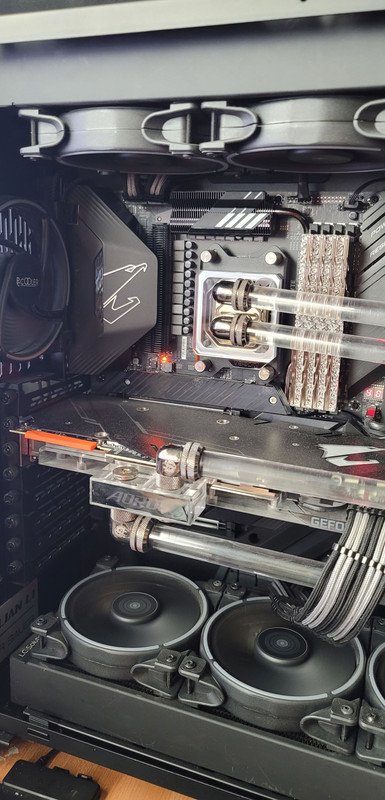
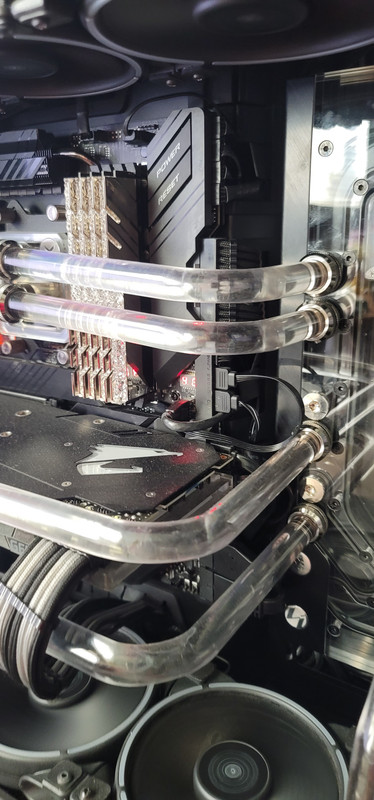
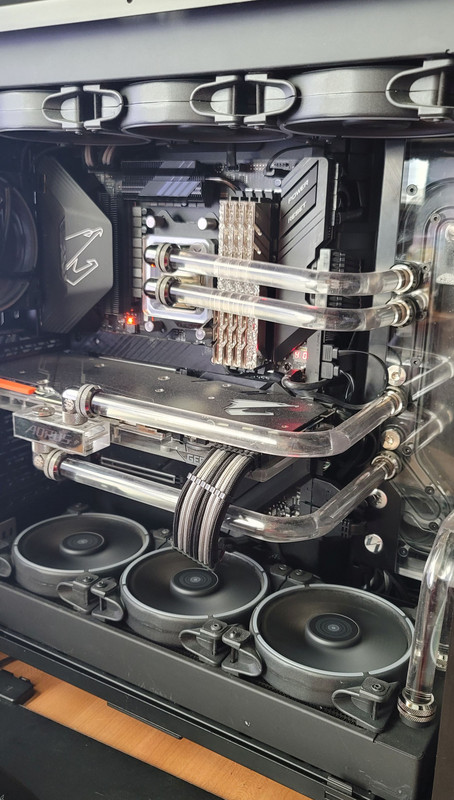
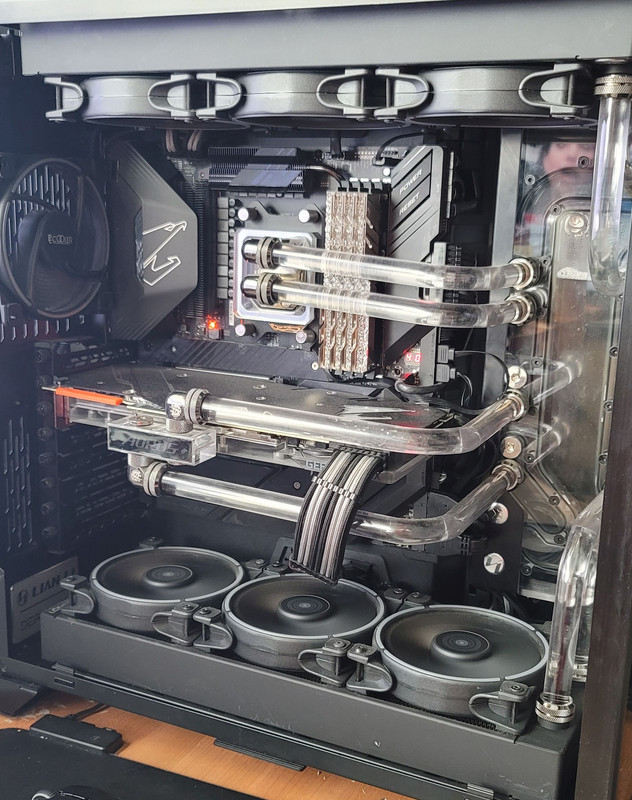
Why do you have the bottom fans as exhaust instead of intake?
 
Here is the reason for my new build. This chart shows the processing times for satellite graphics I produce. When I have everything running, my system slows down dramatically. My threshold needs to stay under 600 seconds (10 minutes). When I disabled a few scripts, you can see that my sever stabilized with a few anomalies here and there. I also believe this is connected to my RAM as well. Currently, I have 24 gigs in my AMD rig, but my new build will have 32 and eventually 64 gigs.

My goal is to my server run all my scripts at full capacity while staying under the 600 seconds threshold.

chart.jpg
 
I'm still being patient looking for the restocks on the newer AMD processors. Worst case scenario I cop a 3950x. I already have an MSI board and 2 NVme HDDs, All that's left for me to get other than the processor are RAM, video card and PSU. Waiting til after I cop the processor to get the other parts.
 
Any laptop recommendations?

whats the need for the laptop?

If it’s just for personal use then make sure you get a minimum of 8 gigs of Ram that can be upgraded to 16. Also, a solid state drive is a must for the operating system.

If it’s for gaming, then the other kats can chime in on that part because I’m not well versed on video card performances.

As far as processors go, AMD Ryzen is a hot product right now and you’ll get a better bang for your buck. However, you can’t go wrong with the 10th gen intel either. You’ll be researching all day trying to figure which will better for you.

my threshold price for laptops is always a minimum of $800. Anything less, then you get what you pay for.

MacBooks are overpriced, but they have the absolute best customer service if that is important to you.

I’m actually still running Windows 7 on my laptop :lol:
 
whats the need for the laptop?

If it’s just for personal use then make sure you get a minimum of 8 gigs of Ram that can be upgraded to 16. Also, a solid state drive is a must for the operating system.

If it’s for gaming, then the other kats can chime in on that part because I’m not well versed on video card performances.

As far as processors go, AMD Ryzen is a hot product right now and you’ll get a better bang for your buck. However, you can’t go wrong with the 10th gen intel either. You’ll be researching all day trying to figure which will better for you.

my threshold price for laptops is always a minimum of $800. Anything less, then you get what you pay for.

MacBooks are overpriced, but they have the absolute best customer service if that is important to you.

I’m actually still running Windows 7 on my laptop :lol:
I just upgraded to Windows 10, but am on a Dell Inspiron with an i7 5th Generation intel chip. I swapped out the HD with an SSD and upgraded to 16 gigs of RAM, but still feels sluggish. I plan on doing a trade-in to Best Buy and get around $150, but am going to clear up space and programs and see how much of a difference it makes.

I've been researching all types of Dell, Lenovos, and Chromebooks, since my girl also needs a laptop. A lot of options but damn near impossible to get the combination i'm looking for.

I'll be using it for browsing and downloading, but I don't want to be too restricted if I run a game or program (autocad). $800 is a good starting point, although I did see a Dell i5 - 11th generation for slightly less. I hate this shit :angry::roflmao2:
 
I've been researching all types of Dell, Lenovos, and Chromebooks
Acer Spin 713 if you want a chromebook. 8gb ram, 128gb storage plus memory card slot. Depending on your needs, this might suffice. You can pretty much run 4 operating systems on one device. Android, Chrome OS, Linux and Windows (coming soon, but possible now with some tweeking). And Linux is not being run thru a VM or Dual Boot, its run right within the Chrome OS environment. So you can have Linux apps, chrome apps and android apps open on the same screen all running together. I've been using them for like 10 years now and don't miss Windows at all.

There are also some new Acer and Asus devices dropping in february. Might want to look into that too.
 
whats the need for the laptop?

If it’s just for personal use then make sure you get a minimum of 8 gigs of Ram that can be upgraded to 16. Also, a solid state drive is a must for the operating system.

If it’s for gaming, then the other kats can chime in on that part because I’m not well versed on video card performances.

As far as processors go, AMD Ryzen is a hot product right now and you’ll get a better bang for your buck. However, you can’t go wrong with the 10th gen intel either. You’ll be researching all day trying to figure which will better for you.

my threshold price for laptops is always a minimum of $800. Anything less, then you get what you pay for.

MacBooks are overpriced, but they have the absolute best customer service if that is important to you.

I’m actually still running Windows 7 on my laptop :lol:
I agree that MacBooks are overpriced based on hardware specs but they have a niche that kind of makes up for it. When it comes to multimedia, they excel well beyond Windows. I believe that's primarily cuz software programmers can focus on a specific build and not have to account for as many variables as what would be found in a Windows pc (drivers, manufacturer nuances, etc...). I use my my macbook for DJing and it performs so much better and fluidly than when I first started DJing with a Windows laptop. If I was doing audio production, I'd default to a Mac as well.
 
Here is the reason for my new build. This chart shows the processing times for satellite graphics I produce. When I have everything running, my system slows down dramatically. My threshold needs to stay under 600 seconds (10 minutes). When I disabled a few scripts, you can see that my sever stabilized with a few anomalies here and there. I also believe this is connected to my RAM as well. Currently, I have 24 gigs in my AMD rig, but my new build will have 32 and eventually 64 gigs.

My goal is to my server run all my scripts at full capacity while staying under the 600 seconds threshold.


Well, you just described your actual problem without even realizing it.. What software are you using for graphics rendering? Almost all current software is beginning to take advantage of the latest drivers from nvidia and AMD for offloading certain functions onto the video cards for rendering.. which gives a helluva performance boost while dramastically cutting rendering time.. Your major equipment part investments should also include a video card that has ray tracing built in. Example:

 
Last edited:
Well, you just described your actual problem without even realizing it.. What software are you using for graphics rendering? Almost all current software is beginning to take advantage of the latest drivers from nvidia and AMD for offloading certain functions onto the video cards for rendering.. which gives a helluva performance boost while dramastically cutting rendering time.. Example:


Peace, what I am doing isn't graphics rendering. My images are produced using python coding on Linux Mint.

Now, it may be possible to incorporate GPU processing as a module for python, but as of now, that is beyond my current technical knowledge.

My python coding 100% dependent on CPU and RAM. I've been working in a terminal so much lately I feel like I'm part of it. lol

If you are familiar with GPU processing in python simultaneously with CPU processing (sort of like parallel computing), then that's the route I need to go.
 
Peace, what I am doing isn't graphics rendering. My images are produced using python coding on Linux Mint.

Now, it may be possible to incorporate GPU processing as a module for python, but as of now, that is beyond my current technical knowledge.

My python coding 100% dependent on CPU and RAM. I've been working in a terminal so much lately I feel like I'm part of it. lol

If you are familiar with GPU processing in python simultaneously with CPU processing (sort of like parallel computing), then that's the route I need to go.

I'm not a coder, but here is where you can start with nvidia..

 
I know thanks,
I just upgraded to Windows 10, but am on a Dell Inspiron with an i7 5th Generation intel chip. I swapped out the HD with an SSD and upgraded to 16 gigs of RAM, but still feels sluggish. I plan on doing a trade-in to Best Buy and get around $150, but am going to clear up space and programs and see how much of a difference it makes.

I've been researching all types of Dell, Lenovos, and Chromebooks, since my girl also needs a laptop. A lot of options but damn near impossible to get the combination i'm looking for.

I'll be using it for browsing and downloading, but I don't want to be too restricted if I run a game or program (autocad). $800 is a good starting point, although I did see a Dell i5 - 11th generation for slightly less. I hate this shit :angry::roflmao2:

Asus ROG Zephyrus G14: 14''FHD IPS, Ryzen 7 4800HS, 8GB DDR4, 512GB PCIe SSD, GTX 1650 GDDR6, WIn10H @ $849.99 (Open Box from $636.99) + F/S (slickdeals.net)

That's good and good for light gaming, I'd get that.

A 5th generation i7 is slow compared to a new generation i3-10100... so you should see a massive difference with any newer processor.

Realitcally you'll be fine with a 550 dollar laptop for just browsing and downloading.

Acer Spin 3 2-in-1 Laptop (Refurb): i5-1035G1, 14" 1080p, 8GB DDR4, 256GB SSD (slickdeals.net)
 
Wanna build my daughter a gaming pc for under $500 her request was a white and clear case. Can anyone help ? She only plays Fortnite, Minecraft, Arc so she doesn’t need nothing too crazy
 
Wanna build my daughter a gaming pc for under $500 her request was a white and clear case. Can anyone help ? She only plays Fortnite, Minecraft, Arc so she doesn’t need nothing too crazy
Gaming pc & under $500 don't go in the same sentence. Video card alone is gonna eat up the majority of that $500 if not all of it. Processor RAM & motherboard will definitely eat up a good chunk of that budget as well. You're gonna wanna bump that budget up by at least $300 for a custom build that will be decent
 
Wanna build my daughter a gaming pc for under $500 her request was a white and clear case. Can anyone help ? She only plays Fortnite, Minecraft, Arc so she doesn’t need nothing too crazy

my pc would handle that easily granted if youre interested.

570 OC 8gig 2600 ryzen 5

selling everything for 500 firm....
 
Yeah I bought that and will sell my system.... I gotta fix it up a bit, do cabling better and so forth...

got the xps with the i5 and 1660ti instead and will return this (G5) it was on slickdeals earlier.
 
Pushing the air from the radiator out.

I get that, but the fan set up is not optimal.

Firstly the lone fan intaking air doesn't have a dust filter since the rear fan is usually used as an exhaust. That's why there's so much dust in the case.

Secondly, that lone fan is the only source of air for the other six fans. That'll reduce their ability to keep things cool.

If the bottom and rear fans are all flipped around, I'd bet that the temps would drop and the dust being brought in would be greatly reduced.
 
Why do you have the bottom fans as exhaust instead of intake?


They don't need to be intake... O11 has enough air coming in.

My CPU (Ryzen 3950X) is in the high 40's & GPU (RTX 2080Ti) hasn't hit 43 degrees that I've seen while gaming. I've had this build up a year.

About to put brass tubing in & change out thermal paste on CPU & GPU.

Stress testing Prime95 small for two hrs at 4.4Ghz 1.310 with LLC3, my CPU hit a max of 67 degrees.

My rig runs cool with two 360 rads, run the fans mostly at 1400RPM
 
Back
Top