Anyone successfully using the usb input on their TV to play popular video formarts???

Rock'Em Sock'Em Jones

Star
Registered
Thinking about grabbing a new TV for the bedroom. One thing that I'm looking into is the ability to plug in a drive and play different video formats via the usb input.

I've seen a couple of models that seem to have the capability. The best option I've seen so far seems to be the "ConnectShare Movie" feature w/ some of the Samsung models. An LG model that I posted in the deals section says that it supports DivX in the specs section of the manual but that was the extent of the info I could find on it. Also read a user review on Amazon that claimed one of the Vizio models could play avi, xvid, mp4, etc. but couldn't find the info anywhere else about it so I'm a bit skeptical on that one.

Other than that a lot of the other brands or models I looked into seemed to be kind of unclear as to how functional they are in this department.

Anybody doing this regularly and if so what TV are you using???
 
Last edited:
Re: Anyone successfully using the usb input on their TV to play popular video formart

not my tv but i got 2 dvd players that have a usb port.

we play movies with a flash drive now.

real simple and easy.
 
Re: Anyone successfully using the usb input on their TV to play popular video formart

Most new laptops have a hdmi port so you can plug it to an extra hdmi slot on your tv.. or you can always go old fashion and use the rgb port.. if you go with the rgb port you wil have to plug the sound in to something else tho.. i havent personally seen a tv that lets you use an usb to view any video format.. i could be wrong tho.. hope that helps..
 
Re: Anyone successfully using the usb input on their TV to play popular video formart

Most new laptops have a hdmi port so you can plug it to an extra hdmi slot on your tv.. or you can always go old fashion and use the rgb port.. if you go with the rgb port you wil have to plug the sound in to something else tho.. i havent personally seen a tv that lets you use an usb to view any video format.. i could be wrong tho.. hope that helps..

Yeah I know about HDMI, but I'm on the laptop quite a bit so I'm trying to avoid running it into the ground. I'm about to buy a new one and don't want to wear it out like my old one.

Push come to shove I'll just go HDMI but the USB option intrigues me a little bit. Seems like it could less of a hassle if I can find one to do what I'm looking for.
 
Re: Anyone successfully using the usb input on their TV to play popular video formart

mp4 & wmv
but can also play them off the ps3 or even the computer if shit get out of hand
PS3 be on some shit with the DCMA restrictions and shit

fuck em though
I get where I gotta go

What TV are using???
 
Re: Anyone successfully using the usb input on their TV to play popular video formart

I have an LG with the USB port and watch the majority of the movies i download here on it. I copy the file/s to a thumb drive, plug it into the TV select movies then im good to go. Never had an issue and love the fact that i can do it.
 
Re: Anyone successfully using the usb input on their TV to play popular video formart

Sony_Media_Player_SMP_N200.jpg


/Thread
 
Re: Anyone successfully using the usb input on their TV to play popular video formart

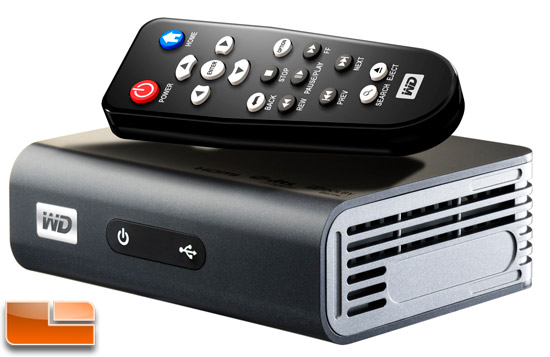
WDTV Live TV Streaming Media Player is all you need. Use the extra money that you are going to spend on on a TV to that plays movies via the usb port to increase the size or get other features. Netflix, Hulu, Spotify as well as other services are contained on the WDTV. My personal opinion is that WDTV Live TV is a better option than Sony.
 
Re: Anyone successfully using the usb input on their TV to play popular video formart

Got a Samsung with USB, works well on all files so far except one;

While playing an MKV file it did not show the embedded subs.
 
Re: Anyone successfully using the usb input on their TV to play popular video formart

Hmmm. Didn't think about the streaming media player option. I'll have to look into that tonight.

What do ya'll think about LED vs LCD in the 32 to 42 in. range???

Is it worth the extra $$$ to go LED???
 
Re: Anyone successfully using the usb input on their TV to play popular video formart

My sister's samsung lcd plays vids through the usb port. It would not play mkv's though. I'm gonna put you on to some shit though. If you have a samsung and a mkv on your usb drive or stick you can just change the extension to avi and it will play. I do not mean convert. I mean change xxxxxx.mkv to xxxxxx.avi. I could not believe my eyes when I saw that. :yes: :D
 
Re: Anyone successfully using the usb input on their TV to play popular video formart

you're better off just using the DLNA capabilities of your tv
 
Re: Anyone successfully using the usb input on their TV to play popular video formart

I have an LG with the USB port and watch the majority of the movies i download here on it. I copy the file/s to a thumb drive, plug it into the TV select movies then im good to go. Never had an issue and love the fact that i can do it.

How are you watching it thru the usb.. all my tvs are lg and whenever ive tried this it only gives me the option to view pictures or listen to music.. am i doing something wrong?
 
Re: Anyone successfully using the usb input on their TV to play popular video formart

you're better off just using the DLNA capabilities of your tv

Hmm. Don't really know much about DLNA. Just did a quick read on it. Does it work smoothly or is it a headache. The article I read kinda led me to believe it's kind of hit and miss.
 
Re: Anyone successfully using the usb input on their TV to play popular video formart

I know what he's talking about

All he wants is to plug external Hard Drive to TV and play his movies like you just plug and play on Laptop

I think its possible with these new SAMSUNG TV's
 
Re: Anyone successfully using the usb input on their TV to play popular video formart

Thinking about grabbing a new TV for the bedroom. One thing that I'm looking into is the ability to plug in a drive and play different video formats via the usb input.

I've seen a couple of models that seem to have the capability. The best option I've seen so far seems to be the "ConnectShare Movie" feature w/ some of the Samsung models. An LG model that I posted in the deals section says that it supports DivX in the specs section of the manual but that was the extent of the info I could find on it. Also read a user review on Amazon that claimed one of the Vizio models could play avi, xvid, mp4, etc. but couldn't find the info anywhere else about it so I'm a bit skeptical on that one.

Other than that a lot of the other brands or models I looked into seemed to be kind of unclear as to how functional they are in this department.


Anybody doing this regularly and if so what TV are you using???

I have a tv that does that and it works GREAT just make sure your files are in 720 or better I have a LG
 
Re: Anyone successfully using the usb input on their TV to play popular video formart

I've been using my XBOX 360. Got a 40 gig External Hard Drive (any brand works), load it up with shit, plug it to the back of the Xbox and use the video player. It doesn't play all formats though. Not sure which.
 
I have an LG with the USB port and watch the majority of the movies i download here on it. I copy the file/s to a thumb drive, plug it into the TV select movies then im good to go. Never had an issue and love the fact that i can do it.

My brother does the same thing. No issues with it whatsoever.

Sent from my HTC One S
 
Re: Anyone successfully using the usb input on their TV to play popular video formart

Hmm. Don't really know much about DLNA. Just did a quick read on it. Does it work smoothly or is it a headache. The article I read kinda led me to believe it's kind of hit and miss.

it's the same thing as using a streaming media box, you're just not coming out of pocket for another unnecessary device. simple to setup, the same as setting up any other device on your wifi network.
 
Re: Anyone successfully using the usb input on their TV to play popular video formart

My Toshiba LED plays everything so far. Has anyone tried wireless HDMI or Intel's WIDI?
 
Re: Anyone successfully using the usb input on their TV to play popular video formart

Media Players. Not sure why anybody would buy a new TV just for a USB port unless its their first flat.
 
Re: Anyone successfully using the usb input on their TV to play popular video formart

Thinking about grabbing a new TV for the bedroom. One thing that I'm looking into is the ability to plug in a drive and play different video formats via the usb input.

I've seen a couple of models that seem to have the capability. The best option I've seen so far seems to be the "ConnectShare Movie" feature w/ some of the Samsung models. An LG model that I posted in the deals section says that it supports DivX in the specs section of the manual but that was the extent of the info I could find on it. Also read a user review on Amazon that claimed one of the Vizio models could play avi, xvid, mp4, etc. but couldn't find the info anywhere else about it so I'm a bit skeptical on that one.

Other than that a lot of the other brands or models I looked into seemed to be kind of unclear as to how functional they are in this department.

Anybody doing this regularly and if so what TV are you using???

here i made this so you can see how DLNA works:

the tv is the panasonic TCP65ST50

 
Re: Anyone successfully using the usb input on their TV to play popular video formart

My sister's samsung lcd plays vids through the usb port. It would not play mkv's though. I'm gonna put you on to some shit though. If you have a samsung and a mkv on your usb drive or stick you can just change the extension to avi and it will play. I do not mean convert. I mean change xxxxxx.mkv to xxxxxx.avi. I could not believe my eyes when I saw that. :yes: :D

mkv is just a container for avi files.
 
Re: Anyone successfully using the usb input on their TV to play popular video formart

Most newer tv's support video streaming in addition to usb playing. I bought an LG and that TV plays the most content vs my Samsung. The only formats the tvs aren't playng is MKV and I use apple tv for that.
 
Re: Anyone successfully using the usb input on their TV to play popular video formart

My TVs don't have USB ports, my cable boxes do. Never tried them. Anyway, my question is: both the Sony and the WD boxes haven't gotten great reviews from what I've seen. Just for the convenience of watching movies from a flash drive is it really worth it? BTW, one of my TVs is connected to my comp, so I just do the dual view thing.
 
Re: Anyone successfully using the usb input on their TV to play popular video formart

PS3 does trip with that Cinavia bullshit :angry:

Thats why I didn't get the Sony Media Player because I wasn't sure if the Cinavia thing came up on those also.
 

This is what I used. But doesn't support as many file types as wdtv live (sony is all about copyright law, especially theirs). I stream movies to tv from computer wirelessly thru this box (tvmolili). The smart TVs i've checked out have usb ports that are used for managing tv settings. I don't see why a box like this can't be integrated into the tv by manufacturer, so i'm sure they exist.
 
Re: Anyone successfully using the usb input on their TV to play popular video formart

Yeah I know about HDMI, but I'm on the laptop quite a bit so I'm trying to avoid running it into the ground. I'm about to buy a new one and don't want to wear it out like my old one.

Push come to shove I'll just go HDMI but the USB option intrigues me a little bit. Seems like it could less of a hassle if I can find one to do what I'm looking for.

Wear out a Laptop?? You must play movies 24/7 :rolleyes:
 
Back
Top